Instagram Reels for startups and apps: explain your product in 15 seconds
Your app solves a real problem, but nobody understands what it does from reading your bio. The Instagram Reel is the perfect format to show your product in action: a problem, your animated screen, a clear benefit, a link in bio. Here are ideas, a ready-to-use script and the pitfalls to avoid for your startup, whether you're launching a beta in San Francisco or a payments app in Lagos.
Ready-to-use prompts
6 video ideas for startups and apps
01The problem in 3 seconds
Open on the hassle your user deals with (lost invoice, long line, unmanageable spreadsheet) in big animated type, then reveal your app as the solution. It's the hook that makes people want to keep watching.
02Animated screen demo
Upload 3 or 4 screenshots of your interface and scroll through them with zooms and an animated cursor to show a complete flow in under 20 seconds. No screen recording and no filming yourself.
03New feature announcement
One Reel per major update: the feature name, what it changes, and “update your app.” It shows the product is alive and re-engages inactive users.
04Save-worthy tip
Share a useful tip related to your space (managing a budget, organizing appointments) with your app at the end of the video. Practical content is what people save and send to friends.
05Before / After
Animated split screen: on the left, the old way (paper, WhatsApp, Excel), on the right, your app. The visual contrast gets your value across without a long explanation.
06Behind the scenes and milestones
App store launch, first thousand sign-ups, out of beta, a booth at Web Summit or GITEX Africa: tell your milestones as an animated timeline. It builds trust around a young brand.
Sample script
On-screen text and voice-over, scene by scene. Paste it into ManyMotion and adapt it to your offer.
Scene 1
“Still tracking your sales in a notebook?”
🎙️ “Still tracking your sales in a notebook?”
Scene 2
Illustrated notebook tearing apart + “Lost numbers, wrong stock”
🎙️ “Notebooks get lost, they get wet, and your stock count is never right.”
Scene 3
App logo + screenshot sliding in: “One sale = 1 tap”
🎙️ “With our app, you record every sale in a single tap.”
Scene 4
Animated dashboard numbers: “Today's profit, live”
🎙️ “And you see today's profit in real time, even offline.”
Scene 5
“Free to get started · Link in bio”
🎙️ “It's free to get started. The link is in the bio, and save this Reel for later.”
A real example made with ManyMotion
App launch
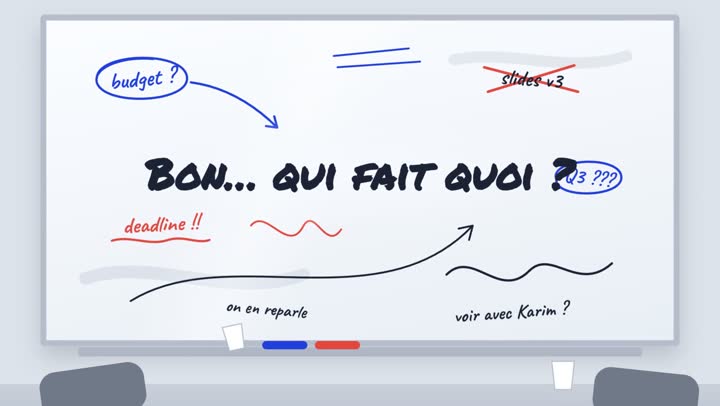
SaaS launch: “Who’s Doing What?”
The question that ends every meeting hangs over a cluttered whiteboard until Nova turns the chaos into a list of action items, each with a name.
Watch the video and its script
What works for startups and apps on Instagram
On Instagram, your Reel is won or lost in the first few seconds, often with the sound off. For a startup, the goal isn't to look pretty: it's to make people understand what your product does and who it's for, before their thumb keeps scrolling.
- One promise per Reel: one feature, one benefit, one call to action. Your full roadmap belongs on your website, not in 20 seconds.
- Show the interface: animated screenshots beat abstract illustrations, and they reassure people that the app really exists.
- Readable on-screen text: large type, outside the areas covered by Instagram's buttons, so it makes sense without the voice-over.
- Answer your industry's objections: “another app?”, “is my data safe?”, “does it work on a weak connection?”, “is it paid?”.
- Time it with key moments: launch, out of beta, major update, tech events (Web Summit, GITEX Africa, Africa Tech Summit), back-to-school season, a year-end “wrapped”-style recap.
Mistakes to avoid
- Speaking in jargon: “AI-powered B2B SaaS platform” means nothing to your user. Describe their problem in their own words.
- Opening on your logo: nobody knows your brand yet, so start with the problem and save the logo for the end.
- Cramming the screen: ten features in 15 seconds means zero recall. Make a series of Reels instead.
- Ignoring local context: in many African markets, mentioning mobile money payments (M-Pesa, MTN MoMo), a lightweight app or offline mode can remove a major barrier.
- Posting once at launch, then disappearing: consistency matters more than one big standalone Reel.
If your app touches finance (payments, lending, savings, investing) or health, be careful: no promises of gains or returns, no promised cures or diagnoses, mention your licenses or regulated partners if you have them, and be transparent about fees and how personal data is used. When in doubt, have a legal professional review your messaging before it goes live.
Frequently asked questions
What's the ideal length for a Reel that showcases an app?
+
Aim for 15 to 30 seconds for a demo or a feature announcement. Long enough to show a problem, your screen and a benefit, short enough to be watched all the way through. Longer formats work best for tutorials people save.
How often should a startup post Reels?
+
Two to three Reels a week is a realistic pace for a small team; what matters is keeping it up over time. Alternate demos, tips, update announcements and behind-the-scenes content. With ManyMotion, you can prepare several Reels at once by describing each idea in the chat.
Do the founders need to appear on camera?
+
It's not required, especially early on. A motion graphics Reel with your screenshots, animated numbers and a voice-over already shows the product very well. You can add more personal content from time to time later if your team is comfortable with it.
How do I know if my Reels are driving downloads?
+
Check saves, shares and link-in-bio clicks in Instagram Insights, then use a separate tracking link (UTM or dedicated store link) to connect visits to installs. Compare your Reels to spot the angles that convert best, and make more along those lines.